AI Kitchen Visualizer: Sell Dated Homes Faster
Use an AI kitchen remodel visualizer to show a property's potential. Turn buyer objections about dated kitchens into offers with virtual renovations.
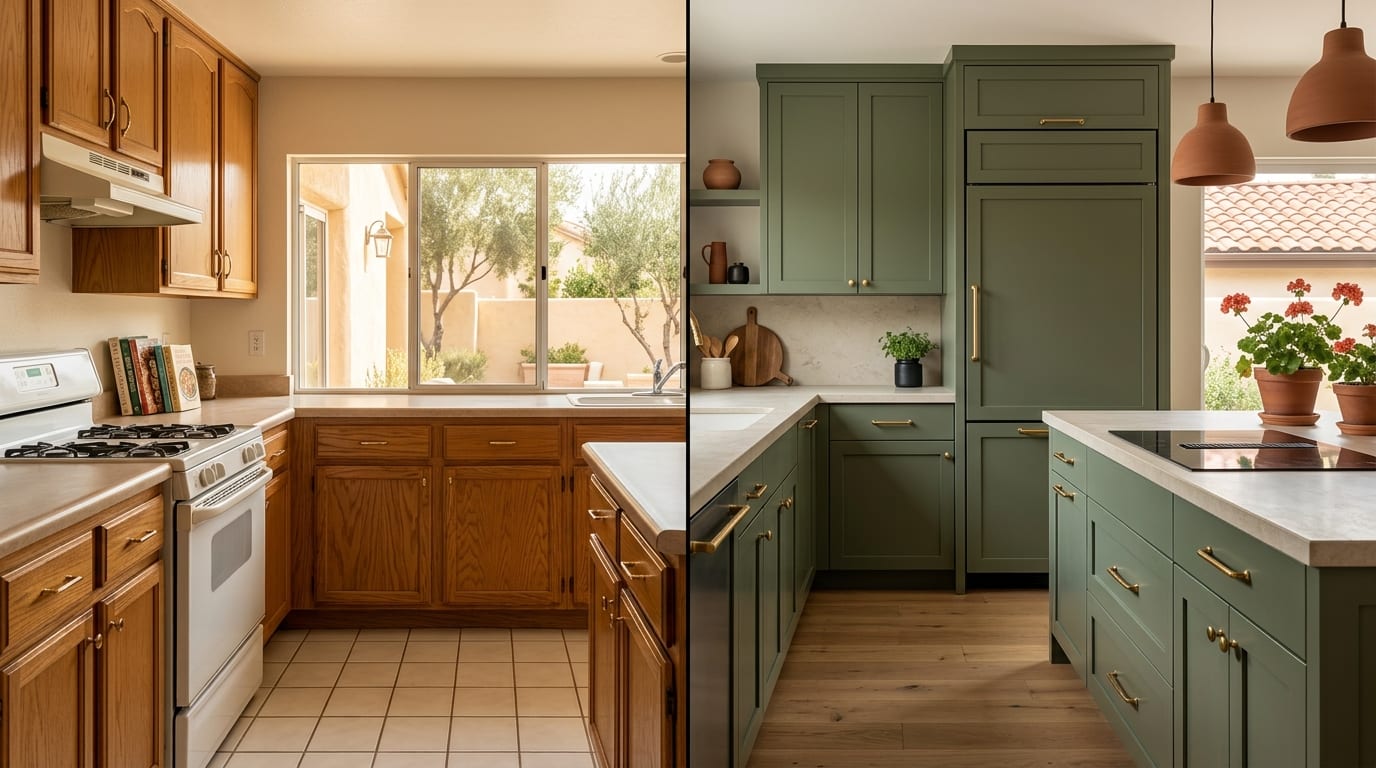
A dated kitchen is killing your listing's potential and costing your client money. Use an AI kitchen remodel visualizer to instantly showcase a modern, renovated space and turn buyer objections into competitive offers.
The Problem: Dated Kitchens Kill Deals
An outdated kitchen is one of the biggest obstacles in real estate. Buyers see worn countertops, dark wood cabinets, and old appliances and immediately calculate the cost and hassle of a full renovation. This lack of vision translates directly into lowball offers or, worse, complete disinterest. The property languishes on the market while newer, move-in-ready homes get all the attention.
Traditional solutions are inadequate. A full physical renovation is too expensive and time-consuming for a sale. Hiring a designer for manual 3D renders can take days or weeks and cost hundreds of euros, a difficult expense to justify for a single listing.
How to Use an AI Visualizer: A 3-Step Playbook
Transform a property's biggest liability into its most exciting feature. Here’s how to use an AI kitchen remodel visualizer for real estate listings in under five minutes.
Step 1: Capture the 'Before' Photo
Start with a high-quality photograph of the existing kitchen. You don't need a professional photographer; a modern smartphone is sufficient.
- Lighting: Open all blinds and turn on all lights for a bright, clear shot.
- Angle: Stand in a corner to capture as much of the room as possible. A wide-angle view works best.
- Declutter: Remove all items from countertops, the sink, and the floor. A clean, empty space produces the best AI results.
Step 2: Generate Renovation Concepts with AI
This is where you instantly create the vision. Using a tool like GetRestage, you can generate dozens of design possibilities in seconds.
- Upload Your Photo: Log in to GetRestage and upload the clean 'before' image.
- Select Room & Style: Choose "Kitchen" as the room type. Select a modern design style that appeals to today's buyers, such as "Scandinavian," "Modern Farmhouse," or "Industrial."
- Add Instructions (Optional): Use the text prompt to guide the AI. For example: "Change cabinets to white shaker style, add a marble countertop, and install a large kitchen island."
- Generate: Click generate. In about 30 seconds, you’ll have photorealistic images of the renovated kitchen. A high-quality 'Listing' image costs just 2 credits.
Step 3: Integrate Visuals Into Your Marketing
Deploy your new 'after' images strategically to capture buyer imagination at every touchpoint.
- Listing Portals: Place the AI-generated image as the second or third photo in your gallery, right after the original. Always add a watermark or caption: "Virtual Renovation Concept."
- Social Media: Create compelling before-and-after carousel posts or reels for Instagram and Facebook.
- Showings & Open Houses: Print the virtual renovation and display it in the kitchen. It helps buyers connect the vision to the physical space.
Renovation Visualization Methods Compared
AI offers a clear advantage in cost, speed, and flexibility over traditional methods. Here’s how the options stack up for a real estate professional.
| Feature | Physical Staging | Traditional Virtual Staging | AI Visualizer (GetRestage) |
|---|---|---|---|
| Cost | Thousands of euros | €15 - €40+ per photo | ~€0.20 - €0.75 per photo |
| Speed | 1-3 weeks | 24-72 hours | < 30 seconds |
| Flexibility | Low (fixed design) | Medium (revisions take time) | High (generate endless styles) |
| Scalability | Very Low (one property) | Medium (agency-dependent) | Very High (unlimited listings) |
Frequently Asked Questions
Is an AI kitchen visualizer effective for real estate?
Yes, extremely. It helps buyers overcome the mental barrier of an outdated space by showing them a tangible, attractive vision. This emotional connection can lead to faster sales and higher offers by clearly demonstrating the property's hidden potential and justifying its asking price.
How much does an AI kitchen renovation tool cost?
Unlike traditional 3D renders that can cost €15–€40 per image, AI tools like GetRestage operate on a cost-effective credit model. A high-quality 'Listing' image typically costs around €0.20–€0.75, depending on your plan. Monthly plans start at just €12 for 50 credits.
Do I need to disclose that a kitchen image is AI-generated?
Absolutely. Transparency is crucial for building trust. Always label AI-generated or virtually staged images with a clear disclaimer like "Virtual Renovation," "Design Concept," or "Artist's Impression." This ensures buyers understand they are seeing a potential future state, not the current reality.
Next Steps: Turn a Liability Into an Asset
Don't let a dated kitchen dictate the value and timeline of your sale. An AI kitchen remodel visualizer is the fastest, most cost-effective tool for showing buyers the home they could have, not just the one that exists today.
By investing 60 seconds and less than a euro, you can reframe the conversation from "renovation cost" to "future potential."
Sign up for GetRestage for free and create your first virtual kitchen renovation today.
Next step
Stage your next listing with Restage.