Why AI Virtual Staging Looks Fake
Tired of AI virtual staging that looks fake? Uncover the 5 common mistakes in lighting, scale, and style that kill realism and learn how to create
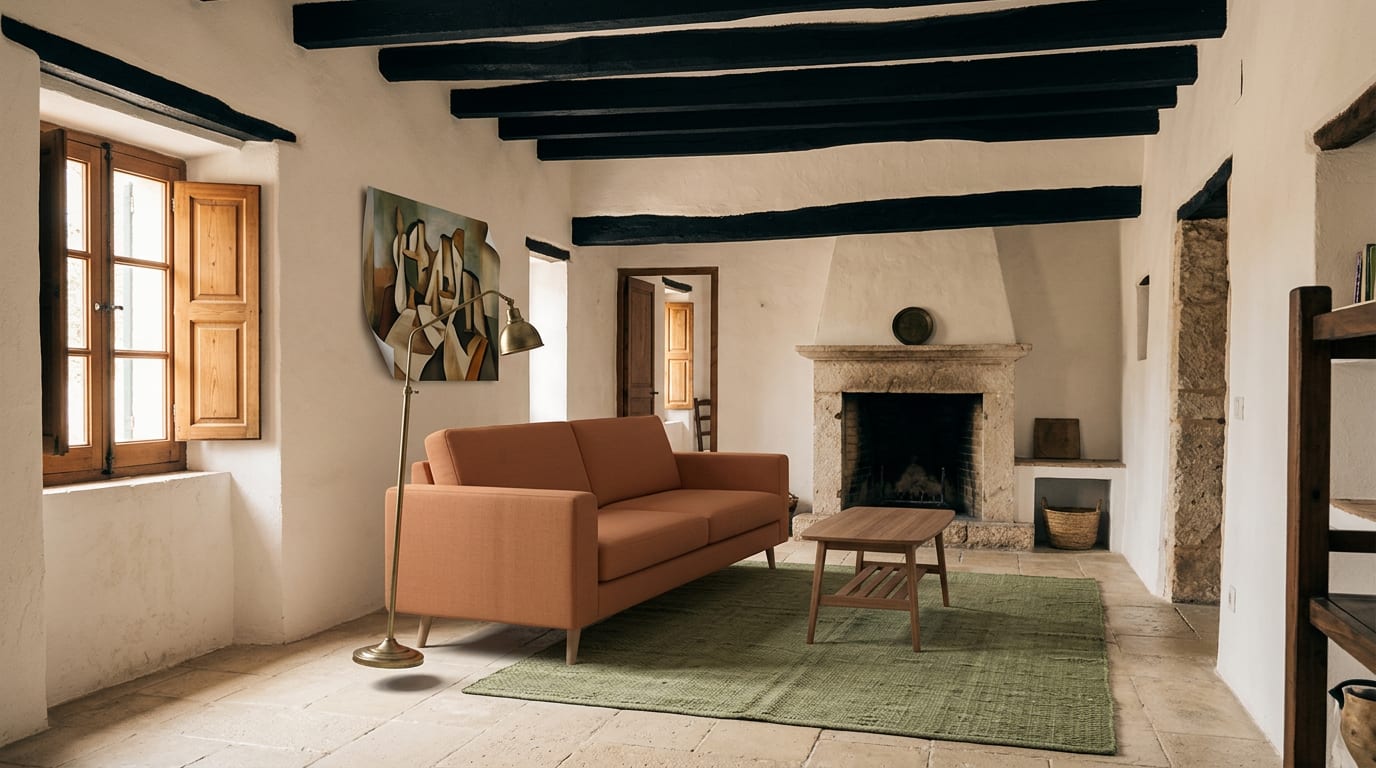
Your AI virtual staging looks fake because of mismatched lighting, incorrect scale, and clashing styles, undermining buyer trust and devaluing your listing. The solution is a professional-grade AI engine trained specifically on architectural data to generate photorealistic results that convert viewers into buyers.
Bad virtual staging is worse than no staging at all. It signals low quality and can make potential buyers question the integrity of the entire listing. This article diagnoses the exact reasons your images are failing and provides a clear framework to fix them.
The 5 Reasons Your AI Staging Fails
Most DIY AI tools are general-purpose image generators, not specialized architectural solutions. This leads to common virtual staging mistakes that are immediately obvious to discerning buyers.
- Incorrect Lighting & Shadows: The AI places furniture with shadows that defy the room's natural light source (e.g., a hard shadow pointing away from a soft, diffused window light). This is the number one giveaway of fake staging.
- Unrealistic Scale & Proportions: Furniture appears too large or small for the space. A massive sofa is crammed into a small living room, or a tiny rug floats in a vast open-plan area, distorting the buyer's perception of the room's actual size.
- Style Incoherence: The AI mixes clashing design styles—like a rustic farmhouse table with ultra-modern minimalist chairs—creating a jarring and unprofessional look that doesn't appeal to a target buyer profile.
- Low-Resolution Assets: The generated furniture and decor look blurry, pixelated, or like a video game render upon close inspection. They lack the crisp textures and details of real-world objects.
- Floating Objects: Furniture doesn't appear grounded. Legs of chairs or tables don't quite touch the floor, or there's a lack of contact shadows, making objects look like they are hovering slightly above the ground.
How to Make Virtual Staging Look Real: A 3-Step Fix
Achieving photorealism requires a deliberate process, not just a one-click generation from a generic tool. Follow this playbook to avoid the common pitfalls.
Step 1: Prepare a High-Quality Source Image
Your output is only as good as your input. Start with a well-lit, high-resolution photo of the empty room, preferably taken with a wide-angle lens from a corner to show the entire space. Ensure the lighting is even and natural, as this provides the AI with the correct information to generate realistic shadows.
Step 2: Define a Coherent Design Brief
Don't just ask the AI for "a modern living room." Be specific. Define a clear style (e.g., "Scandinavian Minimalist," "Mid-Century Modern," "Industrial Loft") and a color palette. This focused direction prevents the AI from mixing styles and producing a chaotic result. Consider the property's architecture and target demographic.
Step 3: Use a Professional-Grade AI Staging Engine
Generic AI tools fail because they lack specialized training. Use a platform like GetRestage, which is specifically designed for real estate. Its AI is trained exclusively on millions of architectural and interior design images, allowing it to understand light, scale, and perspective with incredible accuracy. It automatically analyzes the source photo's lighting to cast perfect shadows and fills the space with correctly proportioned, high-resolution assets.
Comparing Staging Solutions: DIY AI vs. Professional Tools
Choosing the right tool directly impacts your results, budget, and timeline. Here’s how the options stack up:
| Feature | Physical Staging | Traditional Virtual Staging Agency | GetRestage (Professional AI) |
|---|---|---|---|
| Cost | €1,000s per property | €15 - €40+ per photo | ~€0.20 - €0.75 per photo (via credit plans) |
| Turnaround | Days to weeks | 24 - 72 hours | Under 30 seconds |
| Realism | Highest | High (variable) | Photorealistic |
| Revisions | Costly & slow | Slow, often with extra fees | Instant & unlimited |
Frequently Asked Questions
How can you tell if staging is virtual?
Look for giveaways like inconsistent shadows that don't match the room's light sources, furniture that seems to 'float' an inch off the floor, or objects with incorrect proportions. Unnatural textures and a lack of subtle reflections on surfaces are also common signs of bad virtual staging.
Does virtual staging devalue a property?
Bad virtual staging absolutely can. Fake-looking, low-quality images can make a listing seem cheap or untrustworthy, hurting buyer perception. However, professional, photorealistic AI staging adds value by helping buyers visualize the home's potential, which can increase interest and lead to faster sales.
What is the most realistic AI staging?
The most realistic AI staging comes from specialized platforms trained specifically on architectural and interior design data. These tools excel at interpreting a room's lighting, perspective, and scale to generate furniture and decor that look truly integrated into the space, avoiding the common mistakes of generic AI.
Next Steps
Stop letting bad AI staging undermine your listings and erode buyer trust. The difference between a fake-looking image and a photorealistic one lies in the quality of the tool. A professional engine built for real estate is no longer a luxury—it's a necessity for standing out.
Generate stunning, realistic virtual staging in seconds. Sign up for GetRestage and see how professional AI can transform your property marketing today.
Next step
Stage your next listing with Restage.